
World's First AI Interview solution
Naukri Extension
Source, screen, and evaluate candidates directly inside Naukri with AI-powered automation. Create hiring groups, generate interviews, auto-scan applicants, and track progress—all from your Naukri workflow.
→ STEP 1
Extension Installation & Naukri Integration
The InterviewGod Naukri Integration transforms Naukri into a complete hiring platform. Here's the end-to-end workflow from job posting to candidate evaluation:
Installation Process:
 Install extension
- Login with InterviewGod
- Auto-activates across Naukri
- Real-time data sync enabled
- Secure, permission-based access
Data Synchronization:
The Naukri Integration maintains real-time sync:
- Naukri applicants → InterviewGod hiring groups (automatic)
- Interview invitations → Naukri candidate communications (automatic)
- Candidate status updates → Naukri applicant tracking (bidirectional)
- Interview completion → Naukri candidate notes (automatic)
→ STEP 2
Hiring Group
Creation from NaukriHiring Group Creation from Naukri
0:00 / 0:00
Hiring Group Setup — Create AI Interviews Directly from Naukri Jobs
- Extension displays all your existing InterviewGod hiring groups
- Click Create New Hiring Group directly in the extension
- Auto-pull job description
- System identifies technical skills, soft skills, experience requirements, and qualifications
- AI extracts skills
- Edit/add/remove skills
- Auto-generate group name
→ STEP 3
AI Interview/Assessment
ConfigurationAI Interview/Assessment Configuration
Recruiters choose how candidates will be evaluated:
- AI interviews for communication and behavioral assessment
- AI assessments for MCQs and coding evaluation
- Or a combination of both
- Auto quality: Clear audio capture of both AI questions and candidate responses
0:00 / 0:00
0:00 / 0:00
The platform automatically generates interview sections based on extracted skills. Recruiters can:
- Adjust question count and difficulty
- Add custom questions with expected answers
- Enable coding rounds for technical roles
- Configure proctoring and integrity controls: Full screen mode, Tab proctoring, Multiple people detection, Multiple monitor detection, Head Tracking etc.
Recruiters choose how candidates will be evaluated
- AI interviews for communication and behavioral assessment
- AI assessments for MCQs and coding evaluation
- Or a combination of both
- Auto quality: Clear audio capture of both AI questions and candidate responses
Auto-generated interview sections based on extracted skills
0:00 / 0:00
→ STEP 4
Automatic Naukri
Applicant ScanningAutomatic Naukri Applicant Scanning
Real-Time Applicant Scanning
- Automatically scans Naukri applicant lists and syncs new candidates in real time
- Imports candidate profiles, contact details, and resumes without manual effort
- Runs continuously in the background, keeping hiring groups always up to date
High-Volume Applicant Handling
Candidate Data Extraction
Hiring Group Population
Multi-Job Management
0:00 / 0:00

→ STEP 6
Bulk Interview
Distribution from NaukriBulk Interview Distribution from Naukri
0:00 / 0:00
One-Click Bulk Sending:
- Select all shortlisted
- Partial selection
- Click "Send Interviews"
- Automatic distribution: System generates unique interview links and sends invitations
0:00 / 0:00
Interview Invitation Process:
- Unique links generated
- Email invitations sent
- SMS notifications (India)
- Deadline applied
- Status update
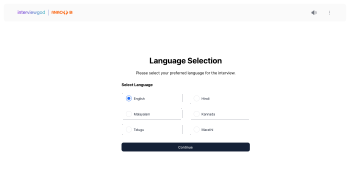
Communication Customization:
- Company name and job title
- Interview type (AI Interview or Assessment)
- Estimated completion time
- Clear instructions for accessing the interview in English and Hindi
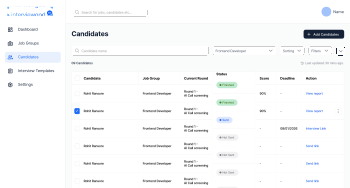
Batch Processing:
- Send to 10, 50, 100, or 500+ candidates simultaneously
- No manual copy-paste of links required
- All invitation processes end in under 60 seconds
- System prevents duplicate sends (won't re-send to candidates already invited)
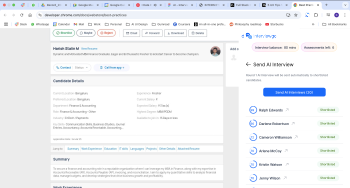
Sending Confirmation:
- Number of candidates receiving invitations
- Successful send confirmations
- Any failed sends (with error reasons: invalid email, invalid phone, duplicate, etc.)
- Option to retry failed sends
- Download list of sent invitations for records
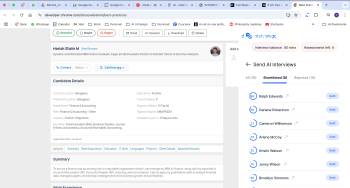
Post-Send Actions:
- Extension displays "Interview Sent" status next to each candidate
- Recruiters can track which candidates received invitations
- Naukri applicant status optionally updates to "Interview Scheduled"
- Platform dashboard shows all invited candidates with pending interview status
One-Click Bulk Sending
- Select all shortlisted
- Partial selection
- Click "Send Interviews"
- Automatic distribution: System generates unique interview links and sends invitations
Interview Invitation Process
Communication Customization
Batch Processing
Sending Confirmation
Post-Send Actions
0:00 / 0:00
→ STEP 7
Real-Time Candidate
Tracking& EvaluationReal-Time Candidate Tracking & Evaluation
0:00 / 0:00
Real-Time Candidate Tracking
- Track live candidate status directly within Naukri: Interview Sent, In Progress, Completed, Expired, or Failed
- Status updates automatically with clear visual indicators—no manual refresh required
- View aggregate hiring metrics including total invites, completions, pending interviews, and completion rate
- Access detailed candidate reports instantly once an interview is completed
- Candidate status syncs back to Naukri to maintain workflow consistency
0:00 / 0:00
Candidate Evaluation
- Review overall score, skill-wise performance, strengths, gaps, and interview duration
- View proctoring flags and AI recommendations for informed decision-making
- Open full reports in the InterviewGod platform for deeper analysis when needed
- Compare multiple candidates side-by-side based on scores and skill performance
- Take immediate next actions: advance to next round, reject, or add internal notes
Real-Time Candidate Tracking
- Track live candidate status directly within Naukri: Interview Sent, In Progress, Completed, Expired, or Failed
- Status updates automatically with clear visual indicators—no manual refresh required
- View aggregate hiring metrics including total invites, completions, pending interviews, and completion rate
- Access detailed candidate reports instantly once an interview is completed
- Candidate status syncs back to Naukri to maintain workflow consistency
Candidate Evaluation
0:00 / 0:00
Learn how companies in Manufacturing, Healthcare, Financial Services use AI interviews for high-volume hiring with custom configurations.